
We are happy to present you with the WSC 2026 Industry Symposia Manual which will take place in Seoul, South Korea on 21-23 October.
Venue Adress:
COEX
513, Yeongdong-daero, Gangnam-gu
Seoul 06164 Republic of Korea (North Entrance)
Website: https://www.coexcenter.com/
This manual covers important information and is designed to assist in preparing for your Industry Session. We trust that you will find it helpful and suggest that you read all the information presented. It will take you very little time now and could save you a great deal of time later.
Please forward this manual to everyone who is working on this project.
For further support, please don’t hesitate to contact me:
Aleksandra Sinapova
Exhibition & Industry Coordinator

E: [email protected] | M: +359 895 76 0548
Exhibitors and Supporters Portal
Each supporter will receive an e-mail with login details to access the Portal. The Portal enables supporters to:
- Submit a company logo and profile
- Submit deliverables as per contract
- Order lead retrievals/scanners
The login details will be sent to the person signing the contract. This person is responsible for passing on the login details to third party if needed.
Access to all Portal services will be available only after submission of your company profile and logo.
Only deliverables, as indicated in your contract, should be submitted via the Portal. Items not included in your contract will not be processed.
Lastly, Kenes Group is offering participants and supporters special rates for various hotels in Seoul. Information, pictures, location and rates are available on the hotel accommodation page:
click here or email us at [email protected] .
Please do not hesitate to contact me for further information or assistance.
We look forward to welcoming you to Seoul and wishing you a successful Industry Session!
Industry Symposia Timetable
https://worldstrokecongress.org/industry-sessions-timetable/
Timetable and halls are subject to changes. The most updated timetable is published on the Congress website.
Important notes:
Due to CME/CPD accreditation criteria for this Congress, the following rules apply:
- Congress banner should NOT be used in any promotional materials created by the supporters.
- Materials created by companies should NOT utilize the main event marketing look and feel.
- When promoting your symposium, please always indicate on any of your promotional materials “This session is not included in the main event CME/CPD credit”
- When promoting your symposium, you are allowed to use the phrase: “Official symposium of 18th World Stroke Congress (WSC)”, which will take place in Seoul, South Korea, on 21-23 October.
- We recommend arriving at least 15 min prior to the start of your Symposium, to check the setup. A member of the Kenes Operational team will be available onsite should you need any assistance.
- Handouts are allowed to be distributed at the entrance to the Symposium Hall; however, it is NOT permitted to place material on the seats inside the hall.
- Printed tent cards placed on the head table are allowed and should be produced and provided by supporters.
- We ask presenters to follow the time schedule precisely in order for the day’s events may run smoothly. The updated scientific program can be found on the WSC 2026 Website
In addition, it is not permitted to use the WSC 2026 logo on any of the symposia materials
Speaker’s Expenses
WSC 2026 will not cover Industry session(s) speaker expenses.
As indicated in the sponsorship agreement, the supporting company, in addition to the support fee, must cover all speakers’ expenses, including registration fees, accommodation and travel expenses.
This also applies in the case where the Sponsored Symposium speakers have already been invited by the Congress and have made prior travel arrangements independently.
Industry Deadlines and Key Dates
Action Item (Please refer to your signed contract) | Deadline | Contact Person |
|---|---|---|
| Staff Hotel Reservation | As soon as possible | https://hotels.kenes.com/congress/WSC26 or email us to: [email protected] |
| Payment of Invoice Balance | Must be received in full one week prior to the Congress | Pazit Hochmitz |
Symposium Final Program (for approval by Scientific Committee) | As soon as possible and no later than Tuesday, 08 September | Aleksandra Sinapova [email protected] |
| Promotional E-mail Blast (Exclusive and Joint) | Tuesday, 15 September | |
| Promotional Post E-mail Blast | Tuesday, 15 September | |
| Text for Push Notifications | Tuesday, 15 September | |
| Mini program book advert | Tuesday, 08 September | |
| Mobile app adverts | Tuesday, 15 September | |
| K-Lead Retrieval System | Thursday,08 October | To reserve your Scanners, please refer to the on‐line Exhibitor’s Portal |
| AV– scheduling Tech rehearsal, placing orders for extra AV for the Sponsored Symposia and AV for Congress rooms ONSITE | Wed, 30 September | Mike Perchig |
| Placing orders for Voting/ ’Ask the Speaker’ and other Technology Products and Services | As early as possible, preferably before Friday, 18 September | Alix McKee |
| Hostesses & Temporary Staff Hire | Please contact the company directly | DOTPLANNER Email: [email protected] |
Catering Services | Monday, 21 September | GRAMERCY Kkonnim Bae Email: [email protected] For Barista Service, click here For coffee break, click here For Boxed Meal, click here For order form, click here |
| Shipping & Material Handling Services | ||
Air freight (Seoul airport) |
Please contact DSV
| DSV Lorena Perdomo – [email protected] Office: +34 930260837 Mobile +34 627582484 Our local office: Mike Lee – [email protected] Mobile: +82 1074808042 For Shipping Instructions, click here |
Road freight direct to the venue | ||
| Road freight via warehouse | ||
Timetable and halls are subject to changes. The most updated timetable is published on the Congress website.
Catering
Catering is exclusive to GRAMERCY and should be ordered in advance. Supporters who wish to order food and beverages for their symposium or/and meeting room are welcome to do so directly with them:
Kkonnim Bae
Email: [email protected]
For Barista Service, click here
For coffee break, click here
For Boxed Meal, click here
For order form, click here
- Food and drinks are allowed to be taken into the symposium halls. No buffet is allowed.
- Please note that an additional charge might be applied for cleaning the hall immediately following the
- If you are planning to have catering together with the symposium, it is recommended to indicate in all publications that breakfast/lunch boxes will be served as long this does not contradict the supporter’s internal compliance policy.
Onsite Symposia Sessions Halls
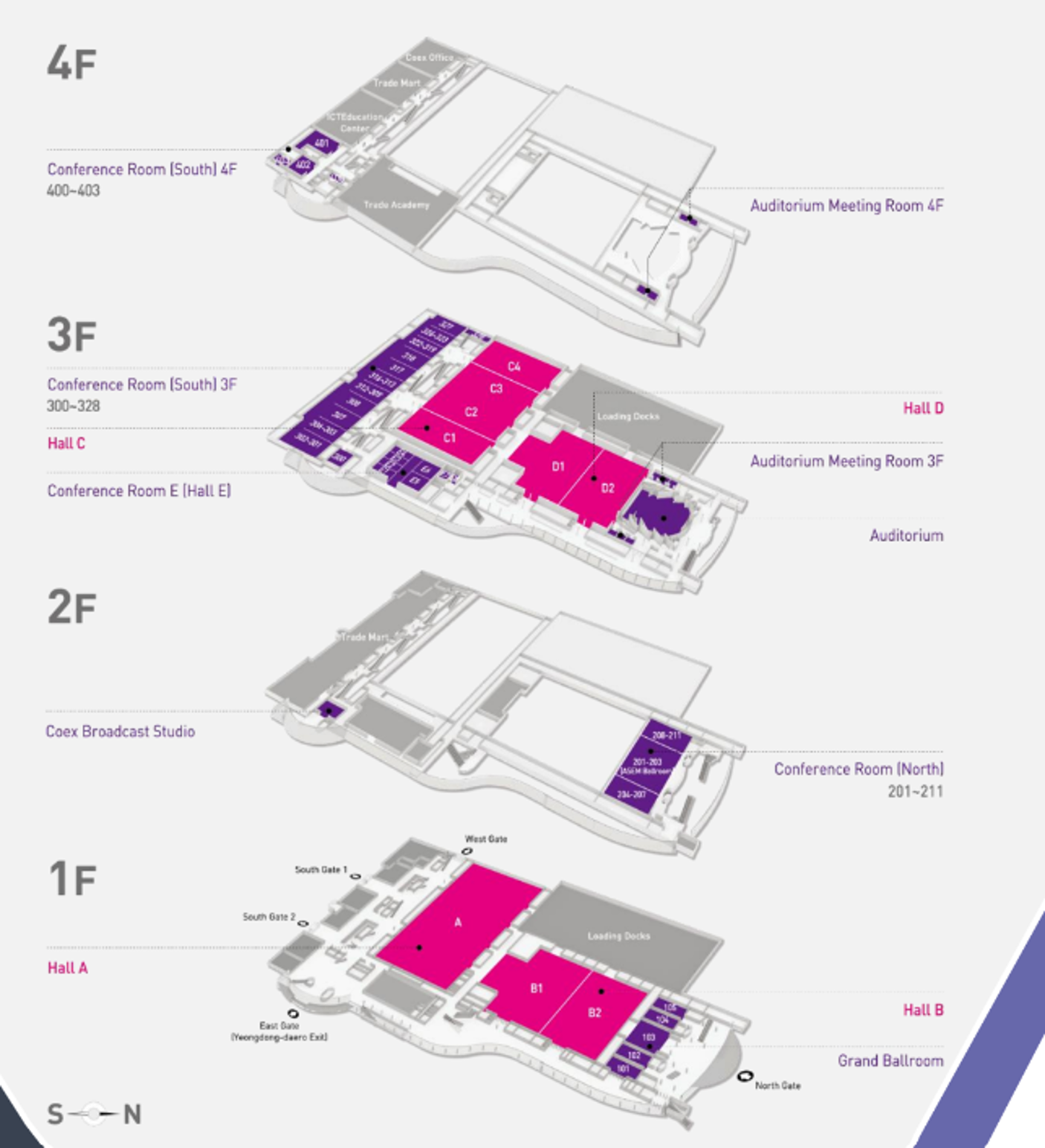
| Hall Name | Location | Hall Capacity | Hall Layout |
| Ballroom 101-102 | 1st floor | 500 pax | Theater |
| Grand Ballroom 103 | 1st floor | 500 pax | Theater |
| Grand Ballroom 104 | 1st floor | 230 pax | Theater |
| Grand Ballroom 105 | 1st floor | 230 pax | Theater |
| Conference Room 202–203 | 2nd floor | 500 pax | Theater |
Location and Layout
Audio-Visual (AV) Equipment Onsite
Hall 101+102
- 2 x front projection screens, image of H3,3 X W6 meters approx. each( 16.9 ratio )
- 2 x 14000 a.l. Data projectors, incl. all the required cabling, for projecting the PowerPoint on the screens.
- 42” Confidence monitor in front of the head table, showing the same image as projected on the main front projection screens.
- Countdown Timer monitor in front of the lectern, operated by the technicians at the AV Control desk.
- Laptop computer for PowerPoint presentations, including English version of Windows and Office, USB port, sound card – located at the lectern and networked to the Speakers’ Ready Room.
- Wireless PowerPoint advancer/clicker (we recommend using the cursor of the laptop computer as a pointer).
- A. (sound) system, which covers the hall and the stage, including wired microphones for the head table, lectern and Questions & Answers with stands (floor/table), 1 wireless headset microphone and connection to sound from computers (mini PL plug) at the lectern.
- Audio monitors for the lectern and the head table.
- Lighting system, illuminating the lectern and the head table.
- AV technician to operate the above-mentioned systems.
Hall 103
- Front projection screen, image of H4 X W7 meters approx. (16.9 ratio)
- 16000 a.l. Data projector, incl. all the required cabling, for projecting the PowerPoint on the screen.
- 42” Confidence monitor in front of the head table, showing the same image as projected on the main front projection screen.
- Countdown Timer monitor in front of the lectern, operated by the technicians at the AV Control desk.
- Laptop computer for PowerPoint presentations, including English version of Windows and Office, USB port, sound card – located at the lectern and networked to the Speakers’ Ready Room.
- Wireless PowerPoint advancer/clicker (we recommend using the cursor of the laptop computer as a pointer).
- A. (sound) system, which covers the hall and the stage, including wired microphones for the head table, lectern and Questions & Answers with stands (floor/table), 1 wireless headset microphone and connection to sound from computers (mini PL plug) at the lectern.
- Audio monitors for the lectern and the head table.
- Lighting system, illuminating the lectern and the head table.
- 2 x AV technicians to operate the above-mentioned systems.
Hall 104 and 105
- Front projection screen, image of H3.3 X W6 meters approx. (16.9 ratio)
- 14000 a.l. Data projector, incl. all the required cabling, for projecting the PowerPoint on the screen.
- 42” Confidence monitor in front of the head table, showing the same image as projected on the main front projection screen.
- Countdown Timer monitor in front of the lectern, operated by the technicians at the AV Control desk.
- Laptop computer for PowerPoint presentations, including English version of Windows and Office, USB port, sound card – located at the lectern and networked to the Speakers’ Ready Room.
- Wireless PowerPoint advancer/clicker ( we recommend using the cursor of the laptop computer as a pointer).
- A. (sound) system, which covers the hall and the stage, including wired microphones for the head table, lectern and Questions & Answers with stands (floor/table), 1 wireless headset microphone and connection to sound from computers (mini PL plug) at the lectern.
- Audio monitors for the lectern and the head table.
- Lighting system, illuminating the lectern and the head table.
- AV technician to operate the above-mentioned systems.
Hall 202+203
- 2 x front projection screens, image of H25 X W4 meters approx. each (16.9 ratio )
- 2 x 8500 a.l. Data projectors, incl. all the required cabling, for projecting the PowerPoint on the screens.
- 42” Confidence monitor in front of the head table, showing the same image as projected on the main front projection screens.
- Countdown Timer monitor in front of the lectern, operated by the technicians at the AV Control desk.
- Laptop computer for PowerPoint presentations, including English version of Windows and Office, USB port, sound card – located at the lectern and networked to the Speakers’ Ready Room.
- Wireless PowerPoint advancer/clicker (we recommend using the cursor of the laptop computer as a pointer).
- A. (sound) system, which covers the hall and the stage, including wired microphones for the head table, lectern and Questions & Answers with stands (floor/table), 1 wireless headset microphone and connection to sound from computers (mini PL plug) at the lectern.
- Audio monitors for the lectern and the head table.
- Lighting system, illuminating the lectern and the head table.
- 2 x AV technicians to operate the above-mentioned systems.
Technical Rehearsal Onsite
We strongly recommend scheduling a technical rehearsal in the hall itself and testing the Presentations during that rehearsal. Please make arrangements directly with the Congress Audio Visual Coordinator, Mike Perchig at: [email protected]
A technical rehearsal is offered free of charge; however additional charges may apply, depending on hall availability, rehearsal requirements and overtime of the technicians.
Presentations Upload Onsite
If you are using a PowerPoint presentation (or any other PC-based application), please note that you have to deliver it on a USB Memory stick to one of the technicians in the Speakers’ Ready Room as soon as you arrive at the Venue in the morning – and at least 1 hour before the start of the session.
Please note that Congress computers in the Halls are being are supplied with Office 2019 (at least) and the native ratio of the projection on the screens in the halls is 16:9.
If you include video clips in your PowerPoint presentation, be sure to test it with the technician in the Speakers’ Ready Room at least 2 hours before the start of the session or as soon as you arrive at the venue in the morning. Please make sure to check it with the technician in the session hall where your lecture is taking place, during a coffee or lunch break prior to your session, at least 30 minutes before the start of the session – even after checking it in the Speakers’ Ready Room.
IMPORTANT NOTE FOR MACINTOSH USERS
To use MAC presentations on the PC compatible Congress computer, please note that you need to prepare it according to the instructions below, before taking it to the speaker room:
- Convert it to PowerPoint or PDF.
- Use a common font, such as Arial, Times New Roman, Verdana etc. (Special characters might be changed to a default font on a PowerPoint-based PC).
- Insert the images as JPG files (and not TIF, PNG or PICT – these images will not be visible on a PowerPoint based PC).
As previously mentioned, we strongly recommend scheduling a technical rehearsal and testing the Presentations during the rehearsal. Please note that an extra charge might incur.
Please plan directly with the Congress Audio Visual Coordinator, Mike Perchig at: [email protected]
Symposium Promotion Onsite and Virtual
Important notes:
Due to CME/CPD accreditation criteria for this Congress, the following rules apply:
- Congress banner should NOT be used in any promotional materials created by the supporters.
- Materials created by companies should NOT utilize the main event marketing look and feel.
- When promoting your symposium, please always indicate on any of your promotional materials “This session is not included in the main event CME/CPD credit”
- When promoting your symposium, you are allowed to use the phrase: “Official symposium of 18th World Stroke Congress (WSC)”, which will take place in Seoul, South Korea, on 21-23 October.
- We recommend arriving at least 15 min prior to the start of your Symposium, to check the setup. A member of the Kenes Operational team will be available onsite should you need any assistance.
- Handouts are allowed to be distributed at the entrance to the Symposium Hall; however, it is NOT permitted to place material on the seats inside the hall.
- Printed tent cards placed on the head table are allowed and should be produced and provided by supporters.
- We ask presenters to follow the time schedule precisely in order for the day’s events may run smoothly. The updated scientific program can be found on the WSC 2026 Website
In addition, it is not permitted to use the WSC 2026 logo on any of the symposia materials.
Session Agenda
The final session agenda should include the following information:
- Session Title (up to 110 characters including spaces)
- Session Description (up to 200 words, you can also include hyperlinks inside of it)
- Speaker Presentations Titles
- Timing – duration of each speaker presentation and full timing of the agenda
- Speaker/Moderator Full Name
- Speaker/ Moderator Country
- Speaker/ Moderator E-mail
- Speaker/ Moderator Affiliation
- Speaker/ Moderator Bio and Photo (please see specs below)
Please see below specs for Speaker Bio and Photo.
- Speaker Bio – up to 200 words.
- Speaker Photo – 180×240 px, JPG Format
Please click here in order to provide above requested information as soon as possible and no later than Tuesday, 08 September. if you need any assistance please contact the Industry Coordinator: Aleksandra Sinapova at [email protected].
Promotional Items
This section includes guidelines which will assist you to prepare promotional items related to your industry sessions, however, kindly refer only to the relevant items in accordance with your sponsorship agreement.
Guidelines to follow when creating your promotional items and content:
- When creating adverts for mobile app, program book and mailshots is allowed to promote product, symposia, or company promotion. Only when promoting symposia please add the following text inside: This session is not included in main Congress CME/CPD credit
- When creating adverts for External and Internal lobby flags in the virtual platform is allowed to promote symposia or company promotion. Only when promoting symposia please add the following text inside: This session is not included in main Congress CME/CPD credit
1.Mobile App Push Notification
For supporters entitled to a push notification as per their signed contract, kindly submit the text by Tuesday, 15 September to [email protected] according to below guidelines:
- Message Title – Maximum 40 characters including spaces
- Message body – Maximum 140 characters including spaces
- Preferred date and exact local time, please coordinate with your industry coordinator
- *Note the final schedule will be determined closer to the Congress, considering other push notifications.
- Push notifications will be sent out during breaks in order not to disturb the participants who are inside the halls.
2.Mobile App Advert
For Supporters sponsoring the App please send via email to and [email protected] by Tuesday, 15 September.
File format: PNG or JPG (up to 800 KB)
Size: 780 x 1688px
Kindly be advised that the advertisement is presented as a static image; therefore please ensure your design does not include any clickable URLs. Also, for optimal readability on mobile devices, we suggest avoiding small text.
3.Mini Program Book Advert
For Sponsors entitled to adverts in the printed program book as per their signed contract, please submit the file by e-mail to the Industry Coordinator [email protected], no later than Thursday, 08 October one A5 Size with one of the following formats at a resolution no less than 300 dpi: EPS, Illustrator, JPG or PDF.
Please prepare the advert in Landscape.
Printing space: Download Here
4.Exclusive Pre and Post Email Blast
Sponsors entitled to an Industry Mailshot as per their signed contract, please click here for the design requirements. Please make sure to forward these guidelines to your web-designer/programmer. Please upload the HTML version of your mailshot and other relevant files together in zip folder and send us everything with the subject line to Aleksandra Sinapova at [email protected] no later than Tuesday, 15 September.
To ease your design process, we’ve created some ‘ready-to-use’ HTML templates that you can modify to suit your specific needs. These templates are designed to align with the design guidelines detailed in the PDF. Feel free to request these templates at any time.
5.Joint E-mail Blast
For the joint e-mail blast, please prepare two files according to the following specifications:
- 1 Banner/Image Format: JPEG Width: 300 pixels Height: 250 pixels
- 1 PDF or any website (to be linked to the banner/image)
Please send the required file(s) to the Industry Coordinator: Aleksandra Sinapova at [email protected] and no later than Tuesday, 15 September.
The exact launch date of the joint e-mail blast will be advised closer to the Congress. It will be sent out to the preregistered participants who have agreed to receive promotional material from supporters.
Important notes for both Pre and Post, Joint Mailshots:
- In case the webmail is promoting a sponsored session, please include the following disclaimer: “This session is not included in main Congress CME/CPD credit”.
- It is not allowed to use the WSC logo.
- The event’s banner will be added to the webmail’s header by Kenes.
- The “From” field will be “WSC 2026 Supporters”.
- The E-mail Blast will be sent out to the preregistered delegates who have agreed to receive promotional material from supporters.
- Content received after the deadline may be processed for an additional fee.
Symposium Signage Onsite (Optional)
Symposium supporters have the option to create signage promoting their symposium according to the guidelines below. The symposium signage should be produced by the supporter.
Session Hall Signage :
- Self-Standing Sign at the Entrance
One stand-alone sign to be placed at the entrance of the session hall 30 minutes prior to the sessions published start time. Please make sure to indicate the following disclosure on the sign: “This session is not included in main Congress CME/CPD credit”.
- Stage Banners :
1 x free standing vertical sign to be placed on/next to the stage. Maximum dimensions: 150cm wide x 250cm high.
Banner placed in front of the head table facing audience. (Please refer to Section 4: Symposia Session Halls Onsite).
Self-standing signage in the Exhibition Area:
The Supporter is entitled to place one sign (W85cm x H200cm) advertising the Symposium on the day of the session only. The sign may be placed in the exhibition area during exhibition opening hours. Please liaise onsite with the Kenes Staff.
Meeting Rooms
Supporters interested in renting a meeting room during WSC 2026 Congress should contact Industry Liaison & Sales, Renata Gorinstein at: [email protected]
Please note that AV and catering are not included and must be ordered separately.
For AV needs, please contact the AV manager Mike Perchig at [email protected].
To protect the integrity of the event program, companies may not organise meetings or activities that compete with official sessions.
- No scientific symposia, lectures, educational events, or “meet-the-expert” style sessions may take place outside the event venue during the event dates.
- All industry sessions must take place within the event venue and must be formally booked through the Sales Team.
- Closed meetings and social events (invitation-only) are permitted only during outside the official blackout hours and must not clash with the event program or Opening Ceremony.
- Internal staff meetings are permitted; however, if attended by event participants, they are also subject to the blackout policy and may not take place during program hours.
The Society expects all partners to respect these guidelines so delegates can fully engage with the official event content.
Catering:
Kkonnim Bae
Email: [email protected]
For Barista Service, click here
For coffee break, click here
For Boxed Meal, click here
For order form, click here
Miscellaneous Information
Wi-Fi
Free Wi-Fi will be available at the Congress venue. Please be aware that public Wi-Fi capacity is limited. Therefore, it is restricted to email and web browsing activity.
Waste Disposal
Please note that it is the supporter’s responsibility to leave the symposium session hall in a clean and tidy manner once your symposium has finished. Any items such as leaflets, banners, roll-ups must be removed from the hall at the end of your session. Any discarded waste, including promotional material, left behind will be removed by the Congress organizers at the expense of the supporter concerned.
Onsite Badges
Each supporter is entitled to 10 Symposium badges which allow access to the supporter’s symposium only (Individual names will not appear on the badges). Symposium badges can be collected 2 hours prior to the session from the Registration Desk and should be returned to the desk after the session ends.
Hostesses & Temporary Staff Hire
Coming soon
Badge Scanner/ Lead Retrieval System
Badge Scanner/ Lead Retrieval System
Lead Retrieval systems are a helpful tool for receiving participants’ contact information when they visit your booth. Information obtained by the lead retrieval system enables Exhibitors to enhance their database by securing valuable leads for further marketing and communication.
We are pleased to offer you the “K-Lead” Application. Exhibitors can download the “K-Lead” app onto their own smart phone or tablet and transform their device into an instant, easy lead retrieval system and capture participants’ full contact information with a quick scan of their badge.
Advantages of the K-Lead application:
- Seamless Integration: Download directly to your device; no extra hardware needed!
- Effortless Scanning: Quickly scan attendee badges to capture leads.
- Customizable Notes: Add personal comments to each lead for better follow-up.
- “Quick Scan” Function: Ability to quickly scan delegates as they enter the symposium hall.
- Instant Access: Get real-time lead information for immediate engagement.
- Universal Compatibility: Download from the Apple Store or Google Play using “Kenes K-Lead App.
Cost per unit: 750 USD (excluding 4% credit card charges fees, excluding VAT if applicable).
Device is NOT included!
Deadline: Thursday, 08 October
Onsite rate of 850 USD will be applied for order received after above deadline.
Unlock the Power of K-Lead Plus:
- Automated Follow-up Emails: Immediately after scanning, send personalized emails to every lead. Make every connection count without lifting a finger!
- Tailored Email Customization: Craft the perfect message with customizable subject lines, email content, and signatures. Attach PDFs to add a polished, personal touch that stands out.
- Timely Engagement: Say goodbye to the hassle of manual follow-ups. K-Lead Plus handles it by sending tailored emails right after each scan, keeping your brand top of mind.
- Trackable Insights: Monitor how your emails perform with engagement metrics. Learn what works and refine your strategies for maximum impact, ensuring you’re always improving.
- Compatibility: K-Lead Plus requires at least one K-Lead license purchased.
Cost for K-Lead Plus: 350 USD
Key Notes for K-Lead and K-Lead Plus:
- Device Not Included: The application must be installed on your personal or company device (tablet/smartphone).
- Reliable Data: Participant badge barcodes carry contact details as provided by registrants or their agencies. Note: Group registration may contain generalized information.
- Content Responsibility: Information content is managed by the registrant or their agency, not Kenes Group or the Organizing Committee.
- Easy Reservation: Secure your Wireless Barcode Reader in the Exhibitor’s Portal https://exhibitorportal.kenes.com.
- GDPR Compliance: We’ve updated our privacy policy in compliance with GDPR. Your personal data won’t be shared without consent. Presenting your badge for scanning implies consent to share your details.
- By purchasing the K-Lead and the K-Lead Plus, Exhibitors and Sponsors agree to Data Processing Agreement.
How to order K-Lead and K-Lead Plus? -> Please access the Exhibitor’s Portal https://exhibitorportal.kenes.com
API Integration
Do you want to use your own scanning device or app? Need real-time API integration?
We’re excited to introduce our new API-sharing service that seamlessly integrates delegate data from our events directly into your CRM. No more manual data entry—just instant, secure, and accurate lead transfer.
- How it works:
- Instant API Access – Scan delegate badges using your own app and retrieve full attendee details.
- Real-Time Sync – Automatically update your CRM.
- CRM Compatibility – Integrates with major CRM systems like Salesforce, HubSpot, and Microsoft Dynamics.
- Data Accuracy – Ensure accurate, up-to-date delegate info, reducing manual entry errors.
- Custom Mapping – Adapt data fields to fit your CRM’s structure.
- Secure & Compliant – Advanced encryption ensures data protection.
- Analytics & Reporting – Gain insights on leads and engagement.
Benefits of this solution?
- Saves time by eliminating manual entry
- Enhances lead accuracy and efficiency
- Integrates effortlessly with your existing tools
To get a quote and place your order, please reach out to the Exhibition Manager E-mail:[email protected]
Cost:
License per event: 1800 USD invoiced before the event
API calls: invoiced after the event, based on the number of calls (scans) made:
– Up to 200 calls – calculated by 4 USD per call
– Up to 500 calls – calculated by 3 USD per call
– From 500 calls and up – calculated 2 USD per call
Deadline: Thursday, 08 October
Innovative Products for Industry Symposia
Maximize your Participant Experience – Use our innovative technologies for your Symposium
Kenes is proud to deliver a wide variety of quality onsite technology products and services.
We offer:
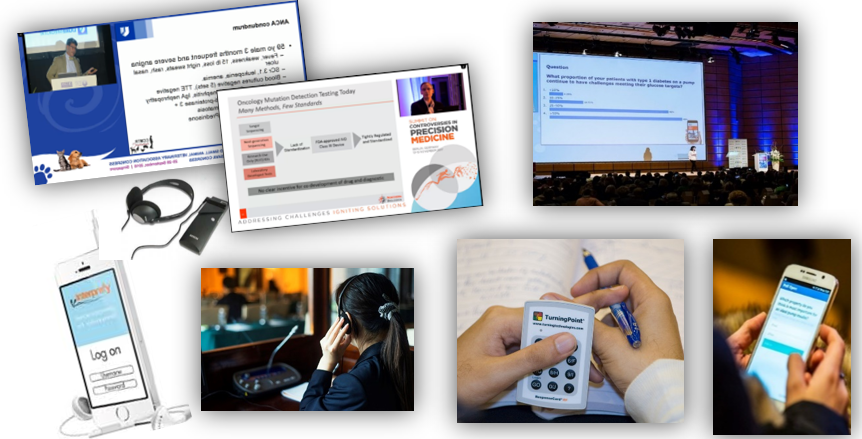
- Live Streaming and many more products designed for capturing and recording symposium content.
- Voting, Evaluations, and more products designed for increasing participant’s interaction during symposium sessions.
- Translation services for any language are available in two options. The conventional approach involves local interpreters and the use of headphone receivers. Alternatively, we offer a cutting-edge AI-powered solution. With this innovative method, participants can access live translations and captions seamlessly by scanning a QR code on their mobile phones.
We also provide tailor made customized solutions – contact us to make it happen!
PLEASE NOTE: All product solutions are offered exclusively by Kenes Group.
Please contact us to discuss your needs and our relevant solutions.
Please submit your order by Friday, 18 September. Orders received after the deadline will incur rush fees.
Shipping Instructions
DSV Fairs & Events Spain has been nominated as the official freight & onsite handling contractor for this congress.
For safety, insurance, and efficiency reasons, DSV are the sole official contractor to handle cargo inside the venue.
DSV offers the following services:
Customs clearance, delivery to the stand, freight forwarding, manpower & trolleys for un-loading/loading during build-up and dismantling, storage of empty crates, transportation to and from the Exhibition Hall and onsite supervision.
DSV
Lorena Perdomo – [email protected]
Office: +34 930260837
Mobile +34 627582484
Our local office:
Mike Lee – [email protected]
Mobile: +82 1074808042
DSV is the exclusive handler inside the venue.
For Shipping Instructions, click here
Deliveries and Shipments
If you need to deliver materials for your session, please coordinate with DSV, the official on-site logistics provider appointed by Kenes Group. All in/out shipments for this congress must be handled exclusively by DSV.
Insurance of Goods
All cargo should be insured from point of origin.
DSV will be able to assist if needed.
Important Information Regarding Direct Deliveries to the Venue:
Road freight:
All direct vehicles going to the venue must pre-book an unloading/reloading time slot before arrival . DSV will provide a time slot reference doc for your vehicle that must be shown to DSV staff upon arrival at the Hilton.
Courier:
Courier companies (FedEx, UPS, DHL, etc.) cannot do the customs clearance of shipments for events or exhibitions as they need an importer with local country tax ID. Please avoid sending cargo with them.
We do NOT recommend shipping materials such as brochures, flyers, bag inserts, lanyards, and small gifts via international courier due to customs regulations and entry restrictions of such items. We suggest producing these materials locally in Buenos Aires if possible.
In case you send goods through courier companies get in touch with DSV in advance to ensure a viability and a smooth clearance.
Please contact DSV for tailor made instructions.
Any deliveries made directly to the venue without going through DSV, will be at the exhibitor’s own risk. If goods do not arrive on time or are mislaid, the organizers and DSV will not take any responsibility.
Sponsors who choose to proceed with direct deliveries must strictly adhere to the following guidelines:
Sponsors who choose to proceed with direct deliveries must strictly adhere to the following guidelines:
Direct deliveries to the venue be coordinated in advance with DSV.
Contact person Lorena Perdomo – [email protected]
All deliveries must have a special label attached. These labels can be obtained from DSV.
Please be advised that neither the organizer nor the venue can accept deliveries on an sponsor’s behalf and arrangements must be made for a company representative to be available when deliveries are made.
Contacts Information
Kenes Group Contacts:
Industry Coordinator
Aleksandra Sinapova
Tel: +41 22 9080488 Ext: 217
Email: [email protected]
Sponsorship and Exhibition Sales
Renata Gorinstein
Tel: +41 22 9080488 Ext.601
Email:[email protected]
Registration
Nerea Esteban
Email: [email protected]
Hotel Accommodation
Anna Ivanova
Email: [email protected]
https://hotels.kenes.com/congress/WSC26
Official Contractors:
Catering:
GRAMERCY
Kkonnim Bae
Email: [email protected]
For Barista Service, click here
For coffee break, click here
For Boxed Meal, click here
Hostesses & Temporary Staff Hire
DOTPLANNER
Email: [email protected]
Freight Handling & Customs Clearance Agent
DSV
Lorena Perdomo – [email protected]
Office: +34 930260837
Mobile +34 627582484
Our local office:
Mike Lee – [email protected]
Mobile: +82 1074808042
DSV is the exclusive handler inside the venue.
For Shipping Instructions, click here